

You have probably experienced both sides of ChatGPT: sometimes it writes something brilliant, other times it gives you a generic paragraph that could have come from anywhere. The difference is almost never the AI — it is the prompt. Learning how to write better prompts for ChatGPT is the highest-leverage AI skill a beginner can build, because every tip here also works in Gemini, Claude, and other chatbots. These 9 practical tips will take your results from vague to exactly-what-you-asked-for.
In This Guide
- Why Prompts Matter More Than You Think
- Tip 1: Be Specific — Kill Vague Requests
- Tip 2: Give Context and Background
- Tip 3: Assign a Role or Persona
- Tip 4: Specify Format, Length, and Tone
- Tip 5: Show an Example (Few-Shot Prompting)
- Tip 6: Set Constraints and Rules
- Tip 7: Ask It to Ask You Questions
- Tip 8: Iterate — Treat the First Answer as a Draft
- Tip 9: Request Step-by-Step Reasoning
- 5 Beginner Mistakes to Avoid
- Frequently Asked Questions
- Key Takeaways
Why Prompts Matter More Than You Think
A language model does not “know” what you want — it predicts the most likely good response to the exact words you gave it. A vague prompt has thousands of plausible interpretations, so the model picks the most a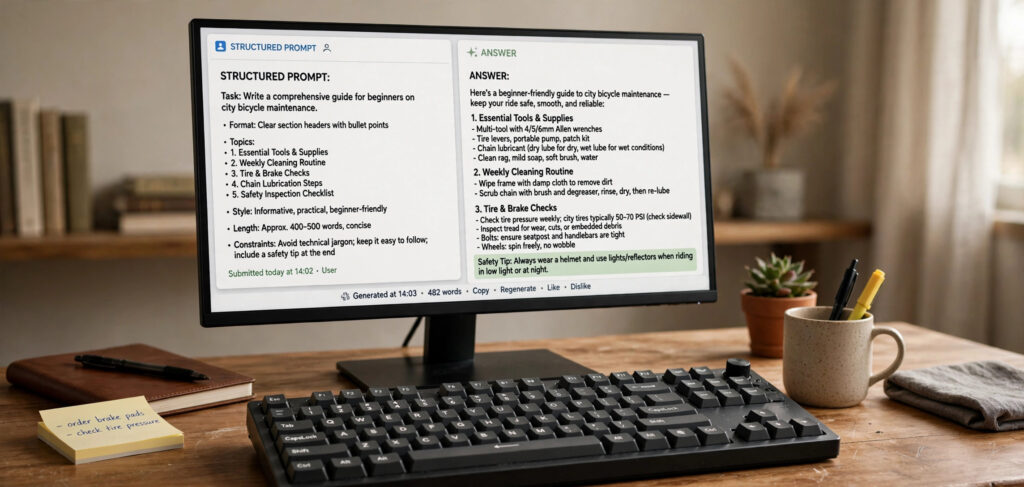 verage one. A precise prompt narrows the possibilities to the answer you actually wanted. Prompting is not tricking the AI; it is communicating clearly, the same skill that makes you good at briefing a human colleague.
The good news: you do not need to learn “prompt engineering” as a discipline. The nine tips below are plain communication habits. Master them and you will get better answers from every AI tool you touch — including image generators, where the same specificity rules apply (see our beginner guide to free AI image generators).
Tip 1: Be Specific — Kill Vague Requests
The number one beginner mistake is asking like you would ask a search engine and expecting a tailored answer.
Weak: “Write about digital marketing.”
Better: “Write a 300-word introduction to email marketing for a bakery owner who has never run a campaign. Focus on the first three steps and keep the tone friendly.”
Notice what the better version adds: audience (bakery owner, beginner), scope (first three steps), length (300 words), and tone (friendly). Each detail eliminates a wrong guess the model might otherwise make. Before hitting send, ask yourself: could a human freelancer deliver the wrong thing from this brief? If yes, add the missing detail.
Tip 2: Give Context and Background
ChatGPT has no memory of your situation unless you provide it. Context is what turns generic advice into useful advice.
Weak: “How do I ask for a raise?”
Better: “I am a junior graphic designer with 2 years of experience at a 30-person agency. My responsibilities grew significantly this year but my pay did not. How should I prepare for a raise conversation with my manager next week? Give me a preparation checklist.”
Relevant context includes: who you are, your experience level, your goal, your constraints (budget, time, tools), and what you have already tried. Two or three sentences of background routinely double the usefulness of the answer. This is especially powerful for study and work tasks — for example, when you use Gemini AI for making study notes, feeding it your syllabus and exam format transforms generic summaries into targeted prep material.
Tip 3: Assign a Role or Persona
Starting your prompt with “Act as a…” focuses the model’s knowledge and tone remarkably well:
- “Act as a senior Python developer reviewing my code for bugs.”
- “Act as a patient math tutor explaining fractions to a 10-year-old.”
- “Act as a hiring manager and critique my resume bullet points harshly.”
Why does this work? The model has seen countless examples of how experts in each field write and reason. Naming the role activates that pattern — vocabulary, priorities, and even the structure of the answer shift toward the expert’s perspective. Combine the role with your specific task for best results: role first, then context, then the request.
Tip 4: Specify Format, Length, and Tone
Never leave the shape of the answer to chance. Tell the model exactly how to deliver:
Format examples: “as a bullet list,” “as a table comparing the three options,” “as numbered steps,” “as a short email draft with a subject line.”
Length examples: “in under 100 words,” “about 500 words,” “a one-paragraph summary plus 5 bullet points.”
Tone examples: “professional but warm,” “explain like I am five,” “direct and no fluff,” “academic tone with citations.”
A complete formatting instruction looks like this: “Compare freelancing vs a full-time job for a new web developer. Present it as a table with rows for income stability, learning speed, and work-life balance. Keep it under 250 words, neutral tone.” The model now has zero formatting decisions to guess at.
Tip 5: Show an Example (Few-Shot Prompting)
When you want output in a particular style, showing beats telling. Provide one or two examples of the input-output pattern you want:
Convert these product names into catchy taglines.

Product: Wireless earbuds
Tagline: Silence the world. Hear the music.

Product: Insulated water bottle
Tagline:
The model will continue the pattern — matching the length, punchiness, and structure of your example. This technique (called “few-shot prompting”) is the most reliable way to get consistent formatting for repetitive tasks like rewriting headlines, categorizing items, or generating variations. One good example is worth a paragraph of description.
Tip 6: Set Constraints and Rules
Constraints force creativity and precision. Tell the model what to avoid, not just what to do:
- “Do not use jargon — explain every technical term.”
- “Give me exactly 5 ideas, each described in one sentence.”
- “Do not mention price; focus only on features.”
- “If you are unsure about a fact, say so instead of guessing.”
That last constraint deserves emphasis: language models sometimes invent plausible-sounding facts (“hallucinate”). Explicitly instructing the model to flag uncertainty — or to answer only from information you pasted in — noticeably reduces made-up details. For anything factual that matters (medical, legal, financial), always verify against authoritative sources regardless.
Tip 7: Ask It to Ask You Questions
When you are not sure what context the AI needs, flip the dynamic: make it interview you.
“I want to start a small online business selling handmade candles. Ask me 5 questions that will help you give me a tailored launch plan, then wait for my answers.”
This technique is gold for complex, personal tasks — trip planning, career advice, project scoping — where you do not know what you do not know. The model’s questions reveal the dimensions that matter, and your answers give it the context Tip 2 asks for. It turns a one-shot guess into a real consultation.
Tip 8: Iterate — Treat the First Answer as a Draft
Beginners tend to accept the first output or abandon the conversation. Professionals do neither — they refine. ChatGPT remembers the conversation, so follow-ups are cheap and powerful:
- “Make it shorter — cut it to half the length.”
- “Good, but make the tone more casual.”
- “Expand point 3 with a concrete example.”
- “Now rewrite that for someone who has never heard of SEO.”
- “What is weak about this draft? Be critical.”
That last one — asking the model to critique its own output — is surprisingly effective. It often identifies exactly the vagueness or gaps you sensed but could not articulate. Plan for two to three rounds of refinement on anything important; the first answer is a starting point, not a deliverable.
Tip 9: Request Step-by-Step Reasoning
For math, logic puzzles, planning, or any multi-step problem, ask the model to show its work:
“Solve this step by step, showing your reasoning at each stage: A store offers 20% off, then an additional 10% off the discounted price. What is the total discount percentage?”
Walking through steps produces more accurate answers than jumping to a conclusion — the model, like a student, makes fewer errors when it cannot skip the working. This also lets you spot where its reasoning went wrong if the final answer looks off, instead of just knowing that it is wrong.
5 Beginner Mistakes to Avoid
1. One giant prompt for a giant task
“Write my entire 20-page business plan” produces shallow output. Break big tasks into stages: outline first, then expand section by section. Quality comes from focused prompts.
2. No follow-up when the answer misses
If the answer is wrong, say what is wrong specifically (“this assumes I have a budget — I have zero budget”) rather than re-asking the same question louder.
3. Trusting factual claims blindly
ChatGPT is a reasoning and writing tool, not a database. Dates, statistics, citations, and current events need verification from real sources.
4. Pasting sensitive data
Never paste passwords, private customer data, or confidential company documents into a public AI chatbot. Assume anything you submit could be retained.
5. Asking “can you” instead of just asking
“Can you write a poem about the ocean?” wastes a turn on permission. Just say “Write a short poem about the ocean at dawn.” Direct instructions get direct results.
Frequently Asked Questions
Do these prompting tips work in Gemini and Claude too?
Yes. All major chatbots are instruction-following language models, so specificity, context, roles, formatting instructions, and iteration improve results everywhere. Minor syntax differences do not matter — clear communication is universal.
What is the ideal prompt length?
As long as it needs to be, and no longer. A 20-word precise prompt beats a 200-word rambling one. Include the decision-useful details (audience, goal, constraints, format) and cut everything else. If you find yourself writing paragraphs of throat-clearing, delete them.
Why does ChatGPT sometimes ignore my instructions?
Usually because instructions conflict (“be brief but comprehensive”) or get buried in a wall of text. Put the most important instruction both at the start and the end of long prompts, keep instructions mutually consistent, and break complex requests into steps.
Should I be polite to the AI?
Politeness does not meaningfully change output quality, but clarity does. “Please” is free — use it if you like — but spend your effort on specificity, not manners. Direct, well-structured instructions outperform polite vague ones every time.
How do I get ChatGPT to remember things between sessions?
Use the custom instructions / memory features in ChatGPT’s settings to store persistent facts about you (your role, your preferences, how you like answers formatted). That way you stop repeating the same context in every conversation.
Key Takeaways
- Specificity beats cleverness: audience, scope, length, and tone in every important prompt.
- Context is fuel — two sentences of background routinely double answer quality.
- “Act as a…” focuses expertise; format/length/tone instructions eliminate guesswork.
- Show an example when you want a pattern repeated; set constraints to force precision.
- Let the AI interview you for complex tasks, and always iterate — the first answer is a draft.
- Ask for step-by-step reasoning on multi-step problems, and verify factual claims independently.
Conclusion
Learning how to write better prompts for ChatGPT is not about memorizing magic phrases — it is about communicating with the clarity you would use briefing a smart colleague: specific goals, relevant context, a defined role, explicit format, and honest iteration. Start applying just three of these nine tips today — be specific, give context, and iterate on the first answer — and you will feel the difference immediately. The AI did not get smarter; your instructions did. And that is a skill that pays off in every chatbot, image generator, and AI tool you will ever use.